New Software Name Mozillod5.2f5: Real, Fake, or Risk?
You searched mozillod5.2f5. You got ten results. Every single one told you something different.
One called it an AI productivity platform. Another described it as a next-generation browser. A third spent 2,000 words on its features without once explaining who actually built it. You clicked through all of them and still walked away with nothing solid.
That is not a coincidence. That is the problem with this keyword, and it is exactly what you deserve a straight answer on.
Here is what the evidence actually shows, what the real risks are, and which verified tools do what this software claims to do.
What Is Mozillod5.2f5?
Look at the name closely. “Mozilla” at the front. “5.2f5” at the back. It reads like a legitimate software version. That structure is not accidental.
The Mozilla Foundation is one of the most trusted names in software. Millions of people use Firefox daily. They know that name. They trust it. And a software called Mozillod5.2f5 sits just close enough to that trust to feel credible without actually earning it.
Here is the problem. This software doesn’t have a verified developer. No official company page. No press release. No technical documentation. No changelog. Every article describing its features sources those claims from other articles describing the same features. Circular, unverified, and growing.
Is It Connected to Mozilla?
No. Full stop.
The Mozilla Foundation keeps a public record of every product it ships. Firefox, Thunderbird, the Mozilla Developer Network — all documented, version histories included, publicly verifiable.
Mozillod5.2f5 appears in none of them. Not in a changelog. Not in a release note. Mozilla does not own any GitHub repositories. The foundation has not announced anything remotely resembling this software.
The “Mozilla” in the name is borrowed recognition. That is all it is.
Why Is This Keyword Trending Online?
Nobody on this SERP answers this properly. Pay attention here, because this section protects you better than any feature list ever could.
Synthetic tech keywords are a real and growing tactic. Here is how they work. An automated content system generates an article about a plausible-sounding software name. The keyword is brand new, so competition is zero. The article ranks almost immediately. Other sites scrape it, rewrite it, and publish their own versions. Within weeks, a full page of search results exists about software that was never real. Readers land on those results, spend time on them, and their engagement signals push the articles even higher.
This software follows this pattern to the letter. A name that borrows from a trusted brand. A version number that looks official. A search results page full of articles that all cite each other and nobody external.
How Synthetic Tech Keywords Spread
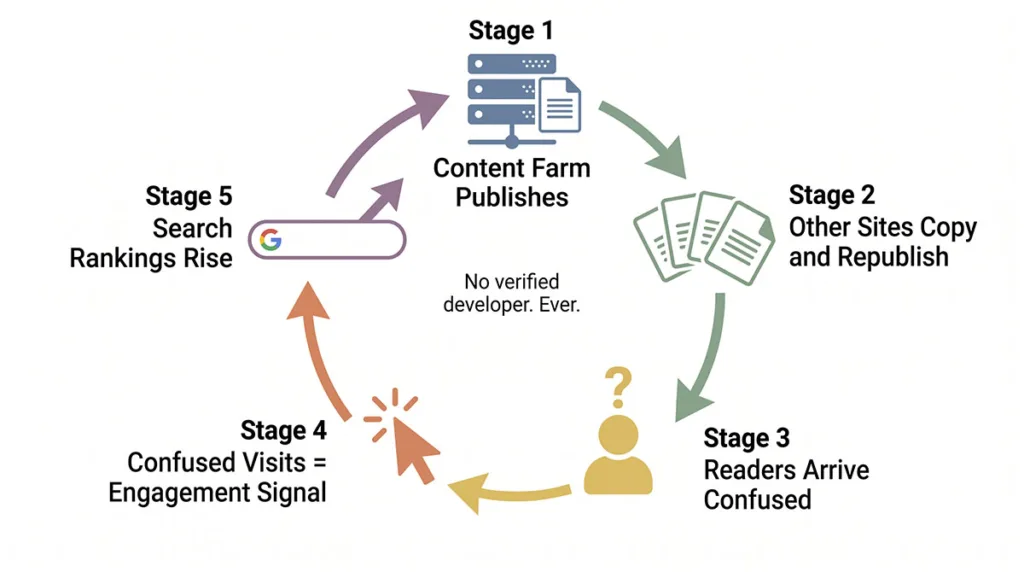
Think of it like a rumor that gets repeated until it sounds like fact.
A content farm publishes first. Verification never comes. Other sites copy the premise, add slightly different wording, and repeat the same unconfirmed claims. Readers arrive confused, spend time trying to find the truth, and leave without it. Every one of those confused page visits registers as engagement. Google sees engagement. Google pushes the articles higher.
This has happened before. Keywords like “Codeye software” and “Webinarach platform” followed identical paths. Articles multiplied. Features were described in detail. Not one source could name a real developer. It sits squarely in that category right now.
Knowing this changes how you read everything about it. The curiosity you felt when you first searched this name? That curiosity is the product. The articles feeding it are the point.
Claimed Features — What the Web Says
Fair question: what does every mozillod5.2f5 review actually say this software does?
Presented honestly, as claims, not confirmed capabilities.
AI-powered automation tops almost every list. Sources describe a system that analyzes usage patterns, anticipates workflow needs, and allocates resources to high-priority tasks without manual input. Like a smart assistant running quietly in the background.
Cross-platform compatibility is another consistent claim. Windows 10, Windows 11, macOS 10.15 and later, and several Linux distributions are all listed as supported. Run it anywhere, apparently.
Security and privacy tools appear in nearly every description too. Sandboxed layers, encrypted communication channels, data protection controls built into the core architecture.
Modular design rounds out the picture. Companies only activate the features that are necessary. Nothing bloated. Nothing unnecessary.
What These Claims Actually Mean
Every single feature above is real. Just not here.
Workflow automation, cross-platform support, modular architecture, AI-assisted productivity — these are well-established software capabilities. They exist in tools with names, developers, documentation, and real users you can actually talk to.
The claims around this software are not describing something new. They are describing a category that already exists. The next section gives you the verified options inside that category.
Is Mozillod5.2f5 Safe to Download?
Direct answer: do not download it from any source you cannot fully verify.
No confirmed safe download source exists for Mozillod5.2f5. Any file carrying this name that you find on a third-party blog, a content site, or an unofficial repository carries real risk until proven otherwise.
Brand impersonation is one of the oldest tricks in the book. Bad actors name malicious software after companies people already trust. Mozilla’s reputation makes “Mozillod” a convincing prefix. Your guard drops slightly because the name feels familiar. A deceptive installer relies precisely on that response.
Red Flags to Watch Before You Download Anything
These red flags apply here and to any software you cannot trace back to a verified source.
- No official website. Real software has a home. If a search returns only blog articles and no developer site, stop right there.
- No changelog. Legitimate software updates. Updates get documented. No documentation means no real development.
- Download links on content blogs. Software belongs on its own site, on GitHub, or in an established store like the Microsoft Store or Apple App Store. A download button buried in a blog post is a warning.
- No named developer. Who built it? Where are they based? What else have they shipped? No answers mean no accountability.
- Wildly inconsistent descriptions. One site calls it a browser. Another calls it an enterprise tool. A third calls it an AI platform. Real software has one consistent, documented identity.
Already Downloaded It? Do This Now
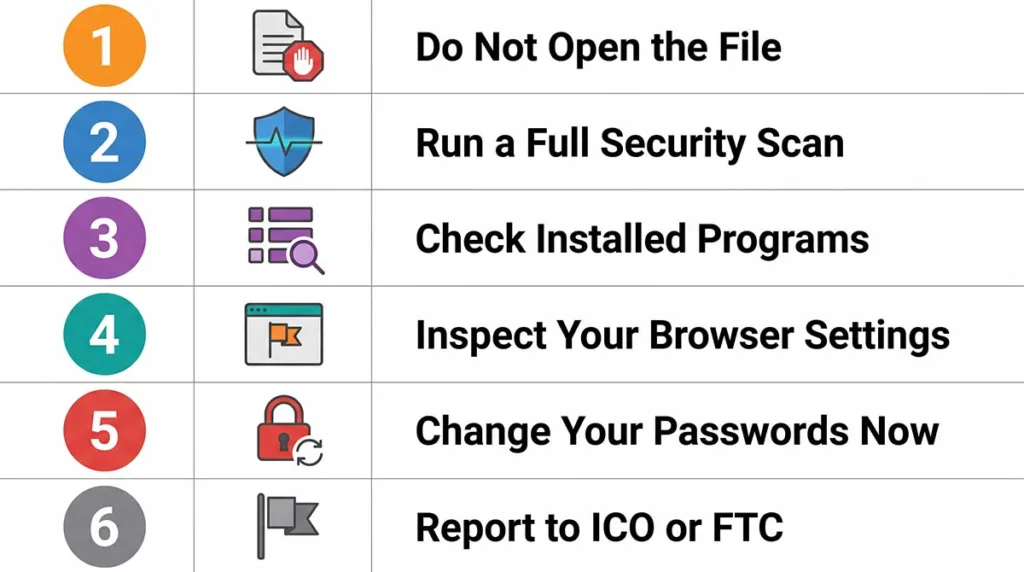
Stay calm. Work through these steps in order.
Step 1: Do not open or run the file. If it is sitting in your Downloads folder untouched, keep it that way.
Step 2: Run a full scan with a trusted security tool. Malwarebytes free version, Windows Defender, or Bitdefender all work. Let the scan finish completely before you do anything else.
Step 3: Open your installed programs list. Windows: Settings, then Apps. macOS: check the Applications folder. Look for anything you did not intentionally install, particularly anything added around the time you downloaded the file.
Step 4: Check your browser. Did your homepage change? Did new extensions appear? Did your default search engine shift without you touching it? If yes, reset your browser settings now. Chrome: Settings, then Reset Settings. Firefox: Help, then Troubleshooting Information, then Refresh Firefox.
Step 5: If the scan flagged anything, or if you entered any credentials after running the file, change those passwords immediately. Start with email. Then banking. Then any other account you accessed on that device recently.
Step 6: If you believe personal data was compromised, report it. UK users contact the ICO (Information Commissioner’s Office) at ico.org.uk. Reports can be submitted by US citizens at reportfraud.ftc.gov.
Six steps. Take them in order. Most people who act quickly avoid serious consequences.
Real Verified Alternatives That Do What Mozillod5.2f5 Claims
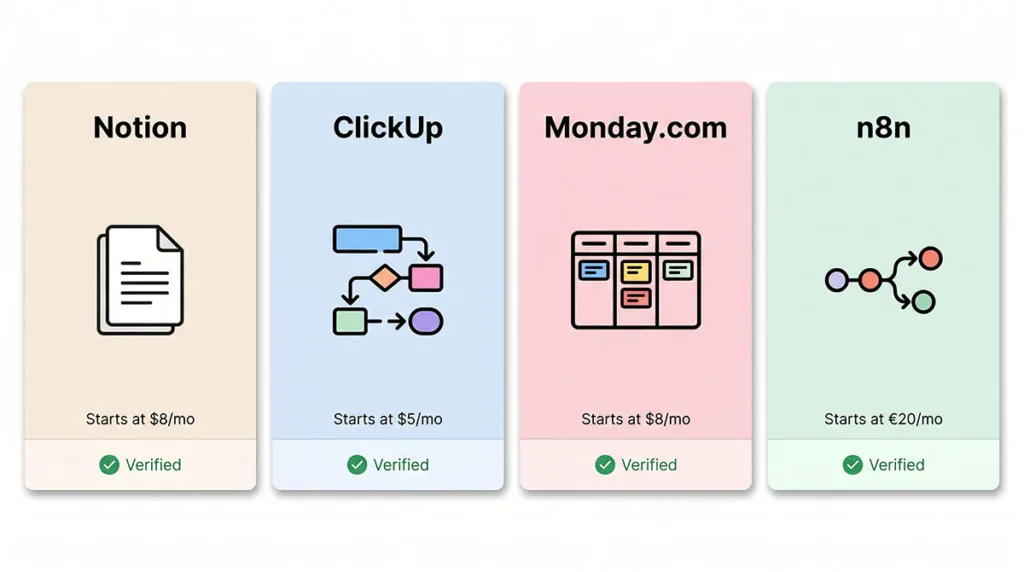
You wanted AI automation, cross-platform support, and a modular productivity system. Those are reasonable things to want. Here are four tools that actually deliver them.
Notion is the one to start with if a flexible, modular workspace appeals to you. It handles documents, databases, wikis, and team collaboration inside one interface. The free plan is sufficient for both individuals and small groups. Paid plans start at $10 per month. Millions of users. A named development team. A changelog you can read right now at notion.so.
ClickUp covers the workflow automation angle properly. Conditional triggers, task dependencies, role-based actions, and automation rules are all built in. The free tier handles most small team requirements without a credit card. Teams that need automation without hiring a developer tend to land here first.
Monday.com suits anyone who needs visual project management with real-time collaboration baked in. It integrates cleanly with over 200 tools, carries verified security certifications, and has a support team you can actually reach. Pricing starts at $9 per user per month.
n8n is the strongest match if AI-powered automation was the specific draw. It is open source, self-hostable, and connects hundreds of apps through customizable workflows. Free to run on your own server. Active community. Documentation that is thorough and current. For technical users who want real control over their automation stack, nothing on this list comes closer.
| Tool | Best For | Starting Price | Verified |
| Notion | Modular workspace, docs, collaboration | Free / $10 per month | Yes |
| ClickUp | Workflow automation, task management | Free / $7 per month | Yes |
| Monday.com | Team collaboration, project tracking | From $9 per month | Yes |
| n8n | AI-powered automation, open source | Free (self-hosted) | Yes |
Every one of these has an official website, a transparent pricing page, a named development team, and a user base you can hear from directly. That is what verified looks like.
Verdict — Should You Use Mozillod5.2f5?
No verified evidence exists that this is a real, legitimate product.
The features attributed to it are genuine software concepts — but they belong to tools with paper trails, developers, and real users. The name borrows from Mozilla without any confirmed connection. The download sources that exist are unverified third parties. The articles covering it repeat each other’s unconfirmed claims on a loop.
One rule covers you here and everywhere else. If you cannot trace software back to a named developer with a documented product history, do not download it. That rule costs you nothing. Ignoring it can cost you a lot.
Frequently Asked Questions
1. What is the new software name mozillod5.2f5?
This is a keyword circulating across tech blogs since late 2025. Various sources describe it as an AI productivity platform or browser tool. No official developer, company, or verified download source has confirmed its existence as a legitimate product.
2. Is mozillod5.2f5 an official Mozilla product?
No. The Mozilla Foundation’s official lineup includes Firefox, Thunderbird, and MDN. It appears in no Mozilla changelog, release note, or official announcement. The name similarity is not an affiliation.
3. Is mozillod5.2f5 safe to download?
No verified safe source exists to download it from. Any file using this name from a third-party blog or unofficial site carries risk. If you already downloaded something under this name, run a full Malwarebytes or Windows Defender scan immediately.
4. Why is mozillod5.2f5 trending online?
Automated content systems seed plausible-sounding software keywords to generate search traffic. The name borrows Mozilla’s brand recognition and uses a version-style number to appear legitimate. Curiosity-driven search behavior amplifies the spread without adding any verification.
5. What are the best alternatives to mozillod5.2f5?
Notion, ClickUp, Monday.com, and n8n all deliver the productivity, automation, and collaboration features this platform claims to offer. All four have verified developers, transparent pricing, and real user communities you can check right now.
Conclusion
Legitimate software always leaves a trail. A developer name. A product page. A changelog. A support team you can actually reach. These are not extras. They are the minimum.
This software has none of them. Check the four verified alternatives above, pick the one that fits your workflow, and skip the risk entirely.
FOr more insightful articles, please visit Bloghart.