
Generate Videos from Simple Text Prompts with a Lyric Video Generator

With the help of AI, lyric video production has become a quicker and more accessible process. Previous workflows required multiple editing tools, tedious manual syncing, and design expertise. Modern prompt-based systems overcome those obstacles with intelligent automation. In the same creative environment, Framia Pro offers text interpretation, lyric synchronization, visual generation and editing. This way, creators can craft high-quality lyric videos with a focus on artistic vision and precise written prompts.
Understanding Prompt-Based Lyric Video Creation
Prompt-based lyric video creation begins with descriptive text instead of manual animation. AI technology processes visual cues, musical context and style preferences to create similar scenes. Detailed prompts help to create a visually compelling scene as they ensure better guidance for colors, lighting, movement, typography, and transitions. Visual pacing is also facilitated by clear descriptions, which help to sync up with the various musical sections. When prompts are combined in terms of atmosphere, symbolism, and emotional development, musical themes will be more easily represented. AI picture to video generation also benefits from such creative processes, enabling static ideas to come to life and ensuring more seamless transitions between scenes.

Writing Effective Prompts for Better Lyric Videos
Great prompts are more than just scenery—each visual element has an impact on audience engagement. Start by setting the scene with lighting, weather, places or atmosphere. Next, define the style of the animation that will be used, such as cinematic motion, minimalist transitions, graffiti effects, or abstract motion graphics.
Typography directions ought to reference the typography character, its placement, how it animates, its readability, and color harmony. Emotional descriptions should be rhythmic and not in opposition to the tone of the song. Framia Pro is able to create scenes that express musical identity by combining visual information with emotional guidance. Additionally, when many creators are creating consistent music visuals over multiple projects, they also utilize this workflow with a lyric video generator.
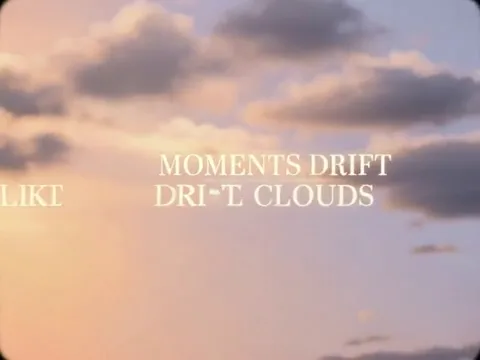
Steps to Generate Videos from Simple Text Prompts with a Lyric Video Generator
Step 1: Select a video model for prompt-based creation
- First, you need to sign up for Framia Pro. Next, go to the “Home” tab present in the left vertical menu bar.
- Later, click on “Agent” from the drop-down menu option present in the bottom-left corner of the dialogue box.
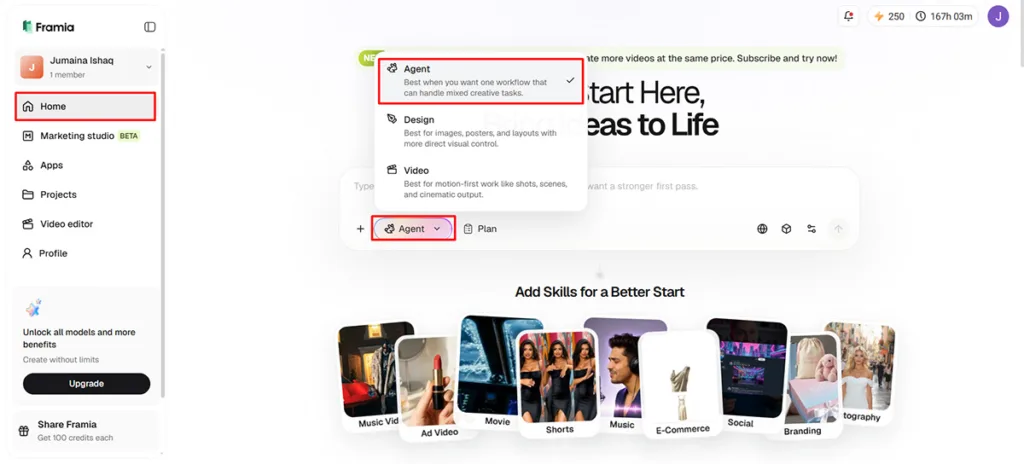
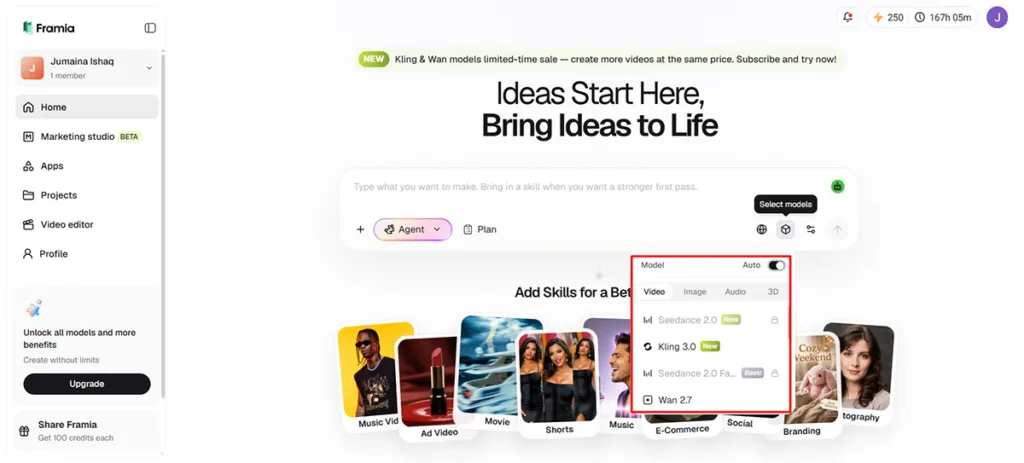
- Next, choose the model that fits your prompt-driven lyric video project.
- Under the “Select models” menu, choose the “Video” option.
- You can select from a range of models like “Seedance”, “Kling”, “Veo”, “Wan” or “Gemini”.
Step 2: Turn your text prompt into a lyric video
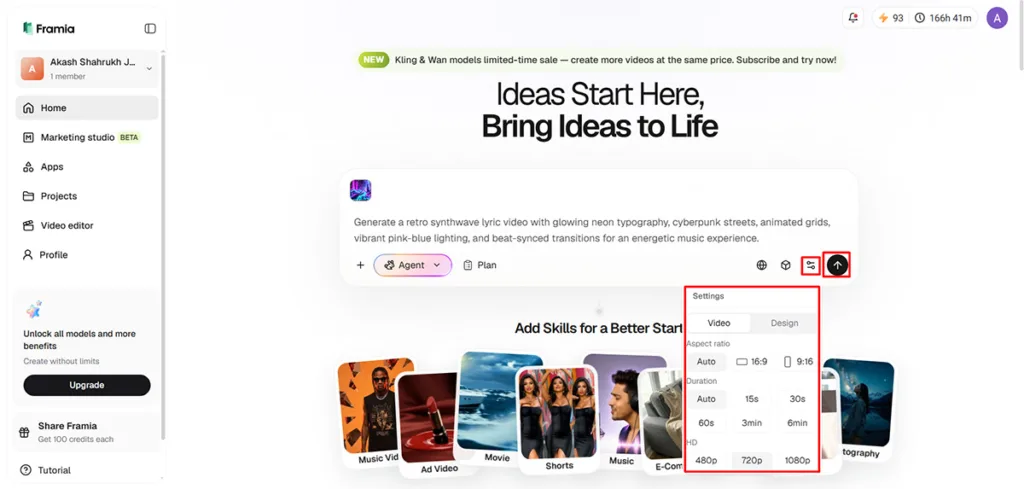
- Now click on the “+” tab and choose an audio from your device to provide as a reference.
- Next, in the dialogue box, enter the text prompt in which you clearly describe every scene, style, animation, and atmosphere you want your lyric video to include.
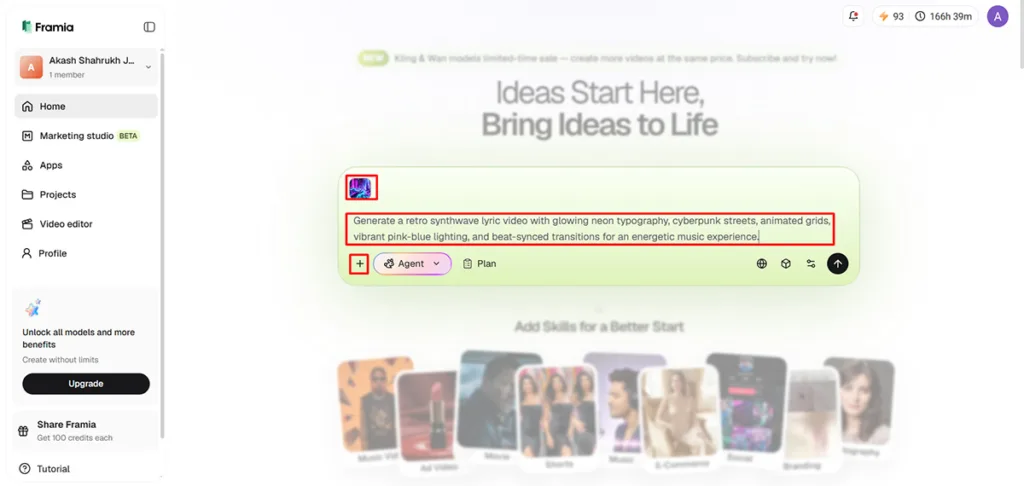
- Later, select the aspect ratio, video duration, and video resolution from the “Settings” tab.
- Finally, click the “Generate” tab to begin lyric video creation.
Step 3: Fine-tune the generated result and export
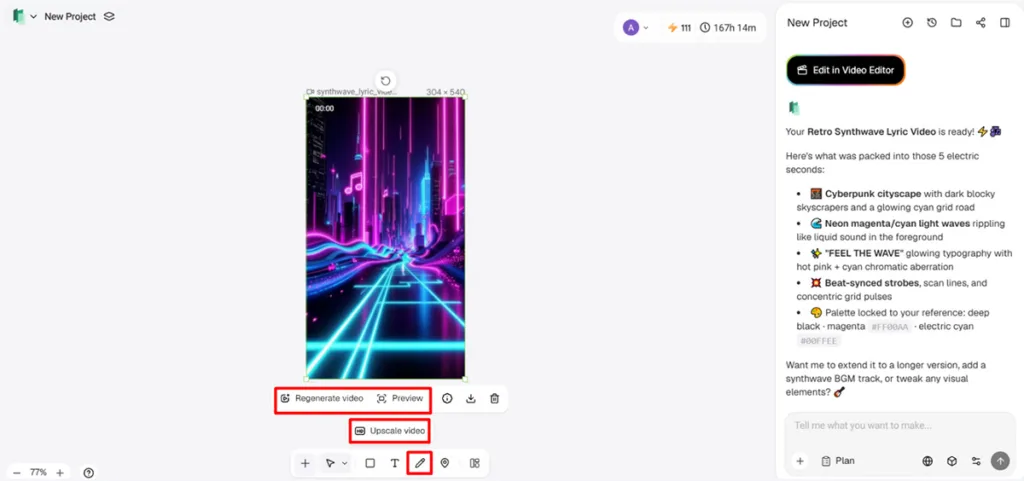
- You can “Preview” your video. If you want to edit your video further, you can adjust scenes if needed in the AI storyboard editor or via chat.
- Furthermore, you can “Upscale video”, “Regenerate video”, or edit your video with text, etc.
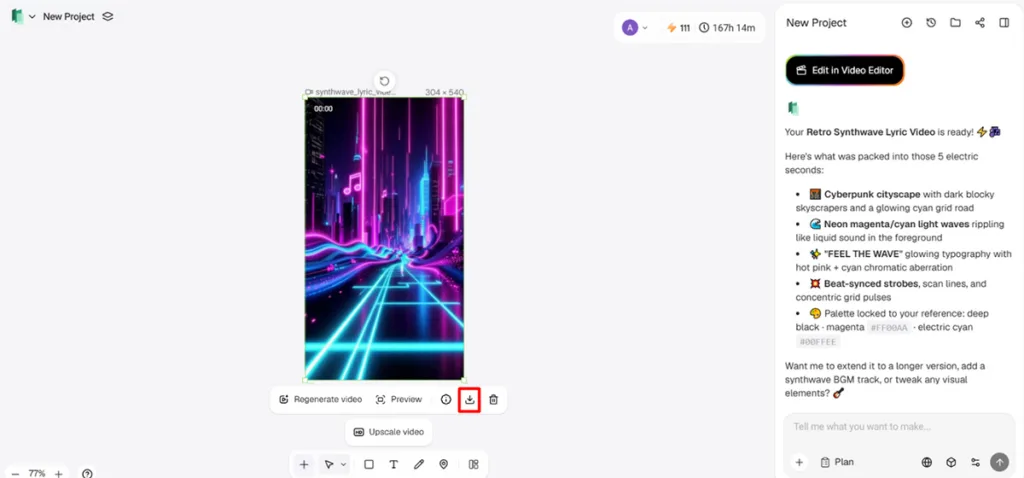
- Once satisfied, click on the “Download” tab present on the menu below the video to save the file to your local device.
How Framia Pro Converts Prompts into Complete Music Visuals
By leveraging language understanding and cutting-edge video generation models, Framia Pro transforms descriptive prompts into coherent visual sequences. The system produces the scene compositions according to the desired environments, colors, lighting conditions, and motion, while ensuring visual continuity between the various parts. Automatic lyric synchronization uses uploaded audio to show text in sync with music, rather than manually positioning it. Intelligent background generation: generates backgrounds according to the request of mood without relying on external resources. The motion effects also react to prompt descriptions and create camera movements, animated typography, transitions, and visual pacing that all go hand in hand with the accompanying soundtrack.
Prompt Ideas for Different Music Genres
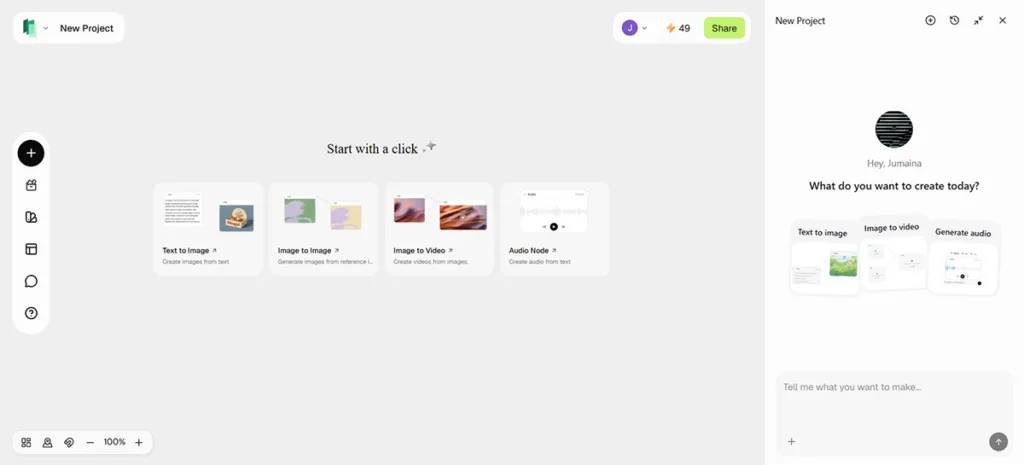
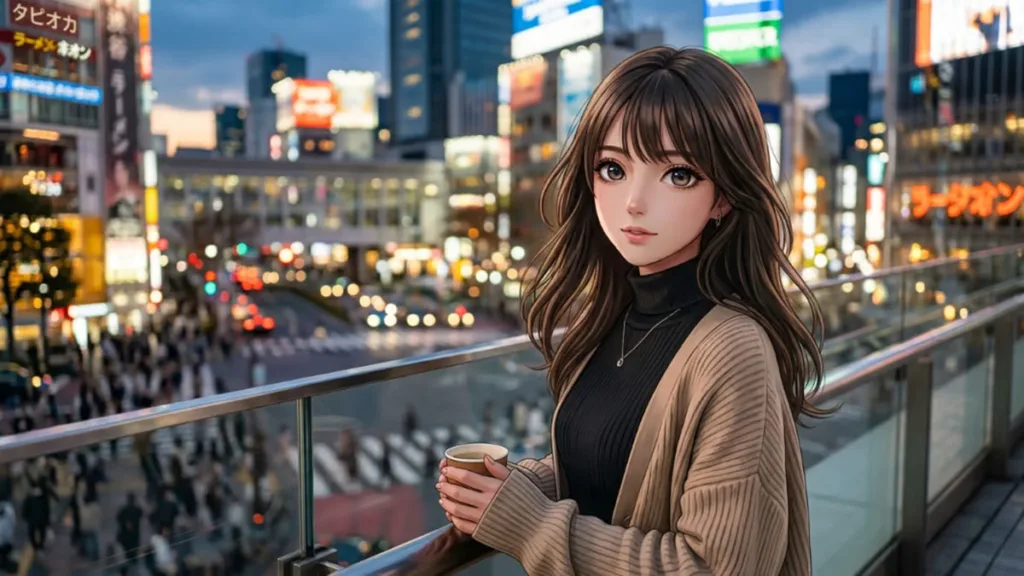
Each musical style will have different visual approaches since it will convey different emotional qualities. Planning prompts for creativity ensures continuity in all scenes and supports musical identity. Whenever prompt descriptions highlight illustrated characters, expressive movement, and stylized settings, Framia Pro accommodates a wide range of artistic approaches, such as workflows akin to those of an anime generator.
- Pop Songs: Bright colors provide energetic visual interest, and seamless cuts lend uplifting melodies.
- Rock Music: Bold textures add to the visual intensity, while the presence of motion adds to the excitement of the performance.
- Urban-inspired environments encourage storytelling with Hip-Hop Tracks, and graffiti typography mirrors familiar genre aesthetics.
- Electronic Music: Neon lighting produces futuristic visuals, while rhythm-based animations work with electronic beats.
- Acoustic Songs: Natural landscapes evoke emotional connections, and minimal transitions maintain a serene tempo.
- Cinematic Ballads: Atmospheric environments enhance dramatic storytelling, while slower camera movement strengthens emotional expression.
Developing AI-Assisted Marketing Assets in One Workspace
Framia Pro features a built-in creative canvas for connected AI agent workflows, rather than singular production tools. The platform automatically structures related creative stages, starting from a plain language objective. Throughout the development process, marketing copy and promotional graphics, social media assets, and visual concepts are all tied together. Video generation models, voice production, music creation and editing functions work within the same workflow, minimizing the need for repetitive transfers between applications. The built-in video editing stage is used to compile the created assets into a single finished product, maintaining a consistent flow in all the creative elements.
Refining AI-Generated Videos Without Complex Editing
Prompt-driven editing eliminates the need for complex timelines and manual edits. Text-based editing commands change backgrounds, typography, transitions, camera moves, or visual style with little effort; no need to build a new project. Storyboard adjustments rearrange the flow of scenes, keeping the lyrics and timing in sync. Selective regeneration keeps regenerating only selected scenes, and not the entire project, thus saving production time and protecting successful visual sections. This focused editing can help expedite changes when the creative direction shifts during production.
Exporting High-Quality Prompt-Based Lyric Videos
Export quality will dictate the clarity of lyrics, typography and visual effects when viewed on other platforms. Framia Pro is capable of producing high-resolution output, such as 4K exports with clear graphics and legible text. Several aspect ratios make it easy to post onto social media, streaming services, websites, and digital presentations. The correct export settings help to keep it all looking consistent and maintain the colors and quality of the scenes, animation, typography, and transitions in the final product. Careful selection of resolution also enhances the quality of the playback on big screens, mobile devices and on the internet.
Conclusion
Prompt-based lyric video generation eliminates numerous manual editing tasks and maintains creative freedom. Well-crafted prompts affect how the scene is composed, typography, movement, mood, and the quality of the narrative. Framia Pro unifies the production workflow, from audio syncing to visual creation, storyboard polishing and superbly high-quality exporting. This systematic process enables creators to produce refined lyric videos efficiently from basic descriptions, ensuring a consistent artistic flow throughout the entire music visualization process.
For more insightful articles, please visit Bloghart.
